
目录
Setting up your robot using tf
Transform Configuration
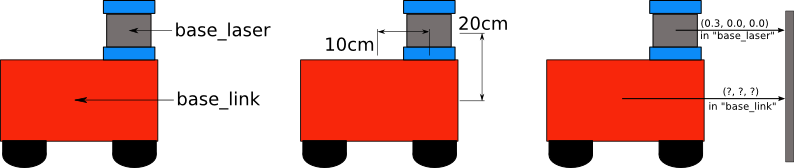

Writing Code
cd %TOP_DIR_YOUR_CATKIN_WS%/src
catkin_create_pkg robot_setup_tf roscpp tf geometry_msgs
Broadcasting a Transform
Create src/tf_broadcaster.cpp
#include <ros/ros.h>
#include <tf/transform_broadcaster.h>

int main(int argc, char** argv){
  ros::init(argc, argv, "robot_tf_publisher");
  ros::NodeHandle n;

  ros::Rate r(100);

  tf::TransformBroadcaster broadcaster;

  while(n.ok()){
    broadcaster.sendTransform(
      tf::StampedTransform(
        tf::Transform(tf::Quaternion(0, 0, 0, 1), tf::Vector3(0.1, 0.0, 0.2)),
        ros::Time::now(),"base_link", "base_laser"));
    r.sleep();
  }
}
Using a Transform
Create src/tf_listener.cpp
#include <ros/ros.h>
#include <geometry_msgs/PointStamped.h>
#include <tf/transform_listener.h>

void transformPoint(const tf::TransformListener& listener){
  //we'll create a point in the base_laser frame that we'd like to transform to the base_link frame
  geometry_msgs::PointStamped laser_point;
  laser_point.header.frame_id = "base_laser";

  //we'll just use the most recent transform available for our simple example
  laser_point.header.stamp = ros::Time();

  //just an arbitrary point in space
  laser_point.point.x = 1.0;
  laser_point.point.y = 0.2;
  laser_point.point.z = 0.0;

  try{
    geometry_msgs::PointStamped base_point;
    listener.transformPoint("base_link", laser_point, base_point);

    ROS_INFO("base_laser: (%.2f, %.2f. %.2f) -----> base_link: (%.2f, %.2f, %.2f) at time %.2f",
        laser_point.point.x, laser_point.point.y, laser_point.point.z,
        base_point.point.x, base_point.point.y, base_point.point.z, base_point.header.stamp.toSec());
  }
  catch(tf::TransformException& ex){
    ROS_ERROR("Received an exception trying to transform a point from \"base_laser\" to \"base_link\": %s", ex.what());
  }
}

int main(int argc, char** argv){
  ros::init(argc, argv, "robot_tf_listener");
  ros::NodeHandle n;

  tf::TransformListener listener(ros::Duration(10));

  //we'll transform a point once every second
  ros::Timer timer = n.createTimer(ros::Duration(1.0), boost::bind(&transformPoint, boost::ref(listener)));

  ros::spin();

}
Building the Code
Append CMakeLists.txt
add_executable(tf_broadcaster src/tf_broadcaster.cpp)
add_executable(tf_listener src/tf_listener.cpp)
target_link_libraries(tf_broadcaster ${catkin_LIBRARIES})
target_link_libraries(tf_listener ${catkin_LIBRARIES})
cd %TOP_DIR_YOUR_CATKIN_WS%
catkin_make
Running the Code
roscore
rosrun robot_setup_tf tf_broadcaster
rosrun robot_setup_tf tf_listener
Publishing Odometry Information over ROS
The nav_msgs/Odometry Message
# This represents an estimate of a position and velocity in free space.
# The pose in this message should be specified in the coordinate frame given by header.frame_id.
# The twist in this message should be specified in the coordinate frame given by the child_frame_id
Header header
string child_frame_id
geometry_msgs/PoseWithCovariance pose
geometry_msgs/TwistWithCovariance twist
Writing the Code
Dependancy
catkin_creat_pkg odometry_publisher roscpp tf nav_msgs
Create src/odometry_publisher.cpp
#include <ros/ros.h>
#include <tf/transform_broadcaster.h>
#include <nav_msgs/Odometry.h>

int main(int argc, char** argv){
  ros::init(argc, argv, "odometry_publisher");

  ros::NodeHandle n;
  ros::Publisher odom_pub = n.advertise<nav_msgs::Odometry>("odom", 50);
  tf::TransformBroadcaster odom_broadcaster;

  double x = 0.0;
  double y = 0.0;
  double th = 0.0;

  double vx = 0.1;
  double vy = -0.1;
  double vth = 0.1;

  ros::Time current_time, last_time;
  current_time = ros::Time::now();
  last_time = ros::Time::now();

  ros::Rate r(1.0);
  while(n.ok()){

    ros::spinOnce();               // check for incoming messages
    current_time = ros::Time::now();

    //compute odometry in a typical way given the velocities of the robot
    double dt = (current_time - last_time).toSec();
    double delta_x = (vx * cos(th) - vy * sin(th)) * dt;
    double delta_y = (vx * sin(th) + vy * cos(th)) * dt;
    double delta_th = vth * dt;

    x += delta_x;
    y += delta_y;
    th += delta_th;

    //since all odometry is 6DOF we'll need a quaternion created from yaw
    geometry_msgs::Quaternion odom_quat = tf::createQuaternionMsgFromYaw(th);

    //first, we'll publish the transform over tf
    geometry_msgs::TransformStamped odom_trans;
    odom_trans.header.stamp = current_time;
    odom_trans.header.frame_id = "odom";
    odom_trans.child_frame_id = "base_link";

    odom_trans.transform.translation.x = x;
    odom_trans.transform.translation.y = y;
    odom_trans.transform.translation.z = 0.0;
    odom_trans.transform.rotation = odom_quat;

    //send the transform
    odom_broadcaster.sendTransform(odom_trans);

    //next, we'll publish the odometry message over ROS
    nav_msgs::Odometry odom;
    odom.header.stamp = current_time;
    odom.header.frame_id = "odom";

    //set the position
    odom.pose.pose.position.x = x;
    odom.pose.pose.position.y = y;
    odom.pose.pose.position.z = 0.0;
    odom.pose.pose.orientation = odom_quat;

    //set the velocity
    odom.child_frame_id = "base_link";
    odom.twist.twist.linear.x = vx;
    odom.twist.twist.linear.y = vy;
    odom.twist.twist.angular.z = vth;

    //publish the message
    odom_pub.publish(odom);

    last_time = current_time;
    r.sleep();
  }
}
Publishing Sensor Streams Over ROS
Dependancy
catkin_creat_pkg sensor_publishers roscpp sensor_msgsROS Message Headers
#Standard metadata for higher-level flow data types
#sequence ID: consecutively increasing ID
uint32 seq
#Two-integer timestamp that is expressed as:
# * stamp.secs: seconds (stamp_secs) since epoch
# * stamp.nsecs: nanoseconds since stamp_secs
# time-handling sugar is provided by the client library
time stamp
#Frame this data is associated with
# 0: no frame
# 1: global frame
string frame_id
Publishing LaserScans over ROS
The LaserScan Message
#
# Laser scans angles are measured counter clockwise, with 0 facing forward
# (along the x-axis) of the device frame
#

Header header
float32 angle_min        # start angle of the scan [rad]
float32 angle_max        # end angle of the scan [rad]
float32 angle_increment  # angular distance between measurements [rad]
float32 time_increment   # time between measurements [seconds]
float32 scan_time        # time between scans [seconds]
float32 range_min        # minimum range value [m]
float32 range_max        # maximum range value [m]
float32[] ranges         # range data [m] (Note: values < range_min or > range_max should be discarded)
float32[] intensities    # intensity data [device-specific units]
Writing Code to Publish a LaserScan Message
Create src/laser_scan_publisher.cpp
#include <ros/ros.h>
#include <sensor_msgs/LaserScan.h>

int main(int argc, char** argv){
  ros::init(argc, argv, "laser_scan_publisher");

  ros::NodeHandle n;
  ros::Publisher scan_pub = n.advertise<sensor_msgs::LaserScan>("scan", 50);

  unsigned int num_readings = 100;
  double laser_frequency = 40;
  double ranges[num_readings];
  double intensities[num_readings];

  int count = 0;
  ros::Rate r(1.0);
  while(n.ok()){
    //generate some fake data for our laser scan
    for(unsigned int i = 0; i < num_readings; ++i){
      ranges[i] = count;
      intensities[i] = 100 + count;
    }
    ros::Time scan_time = ros::Time::now();

    //populate the LaserScan message
    sensor_msgs::LaserScan scan;
    scan.header.stamp = scan_time;
    scan.header.frame_id = "laser_frame";
    scan.angle_min = -1.57;
    scan.angle_max = 1.57;
    scan.angle_increment = 3.14 / num_readings;
    scan.time_increment = (1 / laser_frequency) / (num_readings);
    scan.range_min = 0.0;
    scan.range_max = 100.0;

    scan.ranges.resize(num_readings);
    scan.intensities.resize(num_readings);
    for(unsigned int i = 0; i < num_readings; ++i){
      scan.ranges[i] = ranges[i];
      scan.intensities[i] = intensities[i];
    }

    scan_pub.publish(scan);
    ++count;
    r.sleep();
  }
}
Publishing PointClouds over ROS
The PointCloud Message
#This message holds a collection of 3d points, plus optional additional information about each point.
#Each Point32 should be interpreted as a 3d point in the frame given in the header

Header header
geometry_msgs/Point32[] points  #Array of 3d points
ChannelFloat32[] channels       #Each channel should have the same number of elements as points array, and the data in each channel should correspond 1:1 with each point
Writing Code to Publish a PointCloud Message
Create src/point_cloud_publisher.cpp
#include <ros/ros.h>
#include <sensor_msgs/PointCloud.h>

int main(int argc, char** argv){
  ros::init(argc, argv, "point_cloud_publisher");

  ros::NodeHandle n;
  ros::Publisher cloud_pub = n.advertise<sensor_msgs::PointCloud>("cloud", 50);

  unsigned int num_points = 100;

  int count = 0;
  ros::Rate r(1.0);
  while(n.ok()){
    sensor_msgs::PointCloud cloud;
    cloud.header.stamp = ros::Time::now();
    cloud.header.frame_id = "sensor_frame";

    cloud.points.resize(num_points);

    //we'll also add an intensity channel to the cloud
    cloud.channels.resize(1);
    cloud.channels[0].name = "intensities";
    cloud.channels[0].values.resize(num_points);

    //generate some fake data for our point cloud
    for(unsigned int i = 0; i < num_points; ++i){
      cloud.points[i].x = 1 + count;
      cloud.points[i].y = 2 + count;
      cloud.points[i].z = 3 + count;
      cloud.channels[0].values[i] = 100 + count;
    }

    cloud_pub.publish(cloud);
    ++count;
    r.sleep();
  }
}